So, now being a month into social distancing, it turns out that I’ve have plenty of time to enact some changes that I’ve been wanting to put into place. However, I then haven’t put in the time to actually write about said changes. Today, I correct that oversight, but perhaps not in precise chronological order.
Some aspects of my challenges with my lab have stemmed from the fact that my network was a hodge podge of intentions and compromises that I didn’t have time to go back and fix. The fact that my wife, 3 children, and myself would all need to be at home working and using the Internet from all over the house, I finally had real motivation. Well, that and the fact that I was starting to experience intermittent wireless connection drops and general technical gremlins in the system. Therefore, I undertook the full and complete home and lab network redesign that I really need to do from the start.
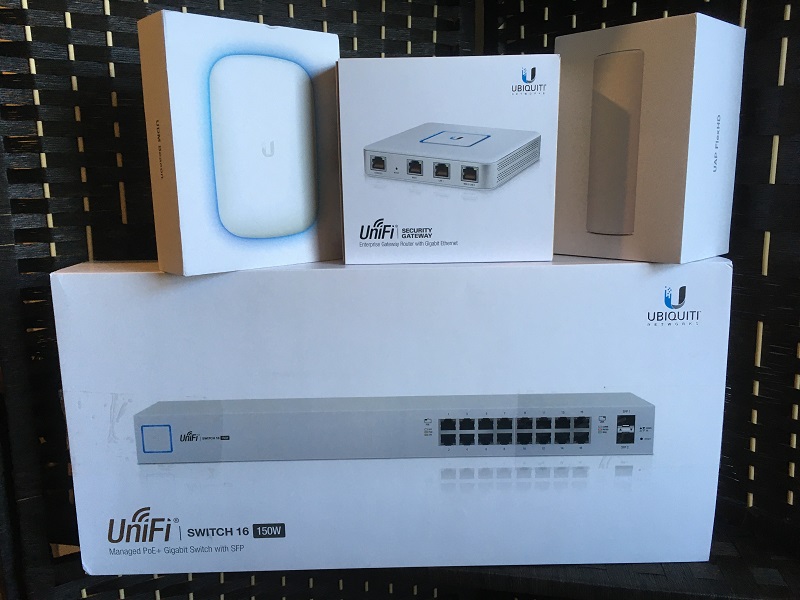
In short…
- UniFi Security Gateway – – Replaces the firewall, gateway, and management functions that my old Buffalo AirStation served
- UniFi Switch 16 150W – – Replaces the Cisco SG200-16
- UniFi FlexHD and BeaconHD – – Replaces the wireless functions of the Buffalo AirStation, with the added benefit of extending the range via wireless mesh technology.
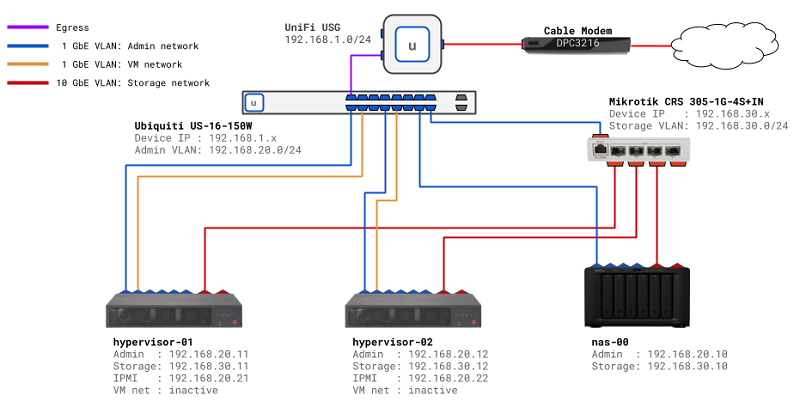
The improvements to the wireless were mostly for general home use, to ensure that we had much better coverage around the house. The added benefit was that the extended range increased signal strength in my office. For the lab, the changes made it much easier for me to implement the VLANs that I originally intended to use for dividing up the network traffic. I can’t say enough positive things about how easy it was to configure the VLANs. Basically all I had to do was define the network with a subnet CIDR and some options about routing, then pick the device and/or port where I wanted the network associated. In the end, here is a diagram of how I adjusted the network for the lab.
In fact, setting up VLANs was so easy and useful, I ended up creating multiple VLANs to divide up the network traffic for other areas of the house. First, I created a VLAN to segregate the primary 5G and 2G wireless networks used in the house. Then I also created a separate VLAN for my wired media devices (e.g. Roku TV, game consoles), and included an additional wireless network in the VLAN. The reason for the shared wired/wireless media VLAN was because I wanted to be able to connect to my Xbox One with the mobile app on my phone; apparently, they needed to be on the same subnet to work.
Ultimately, I was able to re-purpose my old network CIDR block to only be used for the lab, setup the storage network as a proper VLAN, and rearrange my home devices. I now have better wireless coverage, central management of my entire network, and more consistent network performance. It took me the better part of a day to re-route cables, swap out equipment, and generally get the house and lab back up and running… but it was definitely worth the effort.
Next time, we’ll get back to how the hypervisor rebuilds went and what’s next on the project list.