It has been nearly a year since my last update, and the only excuse is truly that I have been busy and the lab setup has needed some fine tuning. When last we visited the environment, I talked about how the network configuration I intended to use was not going to work. The rule of the day that won out was simplification over isolation, and overall that setup has worked well for me to date. Today, we’ll be diving into what the lab has been used for over this past year and what needs to change.
The original intent of this home computing lab was to be able to tinker with virtualization, cloud and container platforms with some automation thrown in for good measure. These are all things I work with daily as part of my job. Ultimately, the main platform for the lab needed to be some form of virtualization, which would then allow me to spin up virtual machine servers for everything else I need to test. Since I work for Red Hat and one of the software products I need to work with is Red Hat Virtualization (based on the upstream oVirt project), that’s what I decided to build.
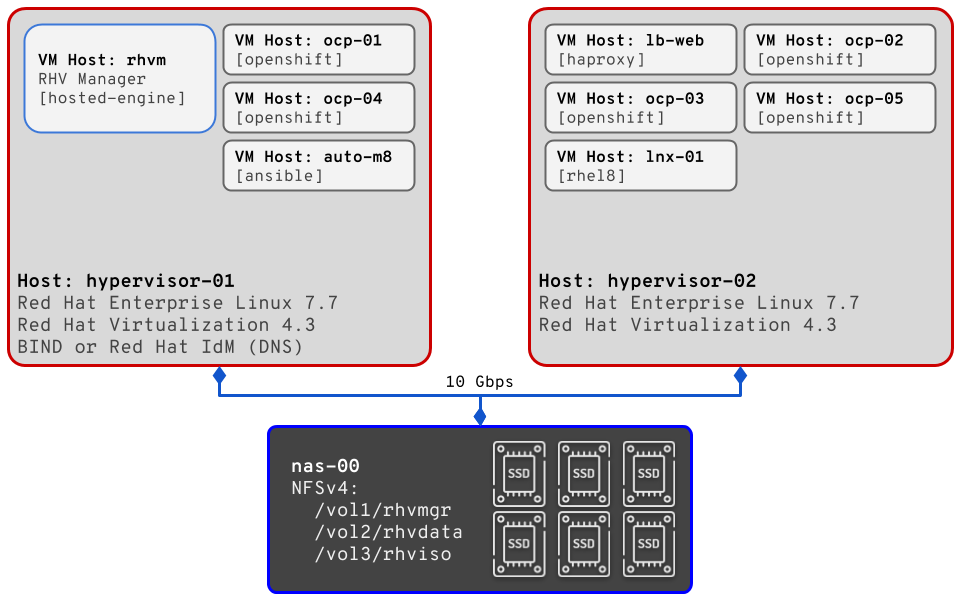
Originally, the physical servers were both running Red Hat Enterprise Linux 7.5 (RHEL), with one configured to provide DNS services for my private lab domain. For the DNS services I chose to use BIND, with the servers setup in a master/slave configuration. While running my own DNS might seem like just some extra nerdy fun, it’s actually a requirement to have fully qualified and resolvable DNS names for Red Hat Virtualization (RHV). As for the original virtualization setup, RHV 4.2 was deployed in self-hosted engine mode with 3 separate networks (mgmt, VM traffic, and storage). In short, self-hosted means that the management engine is configured and then deployed as a virtual machine on the virtualization platform itself. This setup does introduce some complexity, but the benefit is that the manager can move between the two servers. Also, perhaps more important for this environment, it means that I didn’t have to commit one server entirely to acting as manager (and thus, eliminating half my virtualized capacity). The piece that makes the movable manager possible, and also allows for VM migration/movement, is the external storage. On my Synology NAS, I setup 3 storage volumes and made them avaiable via NFS v4 on the 10 Gbps network in the lab. The volumes are for storing the RHV manager data, other virtual machine disks, and ISO images.
Now, that original lab environment worked great for quite some time, and to be honest I should have written about it before. For brevity, here’s a list of some of the testing, tasks, Ansible automation, and deployments I was able to accomplish using the lab :
- Automated configuration of BIND
- Automated initial server postinstall setup
- Subscribe RHEL server
- Enable/Disable repositories
- Install all my preferred admin utilities
- Update system software packages
- Automated provisioning of VMs for OpenShift Container Platform 3.11
- Developed my own bare minimum OpenShift Container Platform 3.11 cluster deployment configuration
- Testing bare metal installation of OpenShift Container Platform 4.1
- Upgraded Red Hat Virtualization 4.2 to 4.3 Beta, and 4.3 Beta to 4.3…
And… somewhere in that series of upgrades, I broke something. The short version: the default route started disappearing from the servers, which broke all outbound network access, which in turn made it extremely difficult and/or annoying to update packages and install software. At this point, my whole lab became unusable for my testing and I knew that I would need to completely rebuild it. The first phase I undertook was to wipe and reinstall the OS, and then I took some time to think about other changes I wanted to make. The new plan looked like this:
- Red Hat Enterprise Linux 7.7
- Initial setup with only 1 NIC configured
- Red Hat Virtualization 4.3
- Two-node self-hosted engine deployment
- All network configuration done via RHV manager
- Only 2 networks (mgmt and storage)
- Red Hat Identity Management
- Instead of configuring BIND, use IdM for DNS
- Allow for quick testing of DNS changes via console
Since I am currently in the grips of social distancing, I have some extra time on my hands, so I plan on working on the lab and this site a bit more in the coming weeks. So, rather than post an epic length single post, I’ll pick up in the next post about the official rebuild and some other improvements I have in plan for the future.